Ipcook review — If you keep getting blocked, served wrong regional results, or want to scrape and research safely, residential proxies are the difference between guesswork and reliable data. This guide explains what proxies do, why Ipcook works well for most use cases, and how to set one up step by step so your searches, SEO work, and lead scraping behave like they should.
Why proxies matter
When websites track your IP they can tailor results, block access, or throw CAPTCHAs at automation. A proxy acts as an intermediary: requests appear to come from the proxy IP instead of your device. That means you can:
- Access region-specific results (useful for market research and SEO).
- Avoid bans and CAPTCHAs when running scraping or automation.
- Protect your real IP and reduce tracking by bots and ad networks.
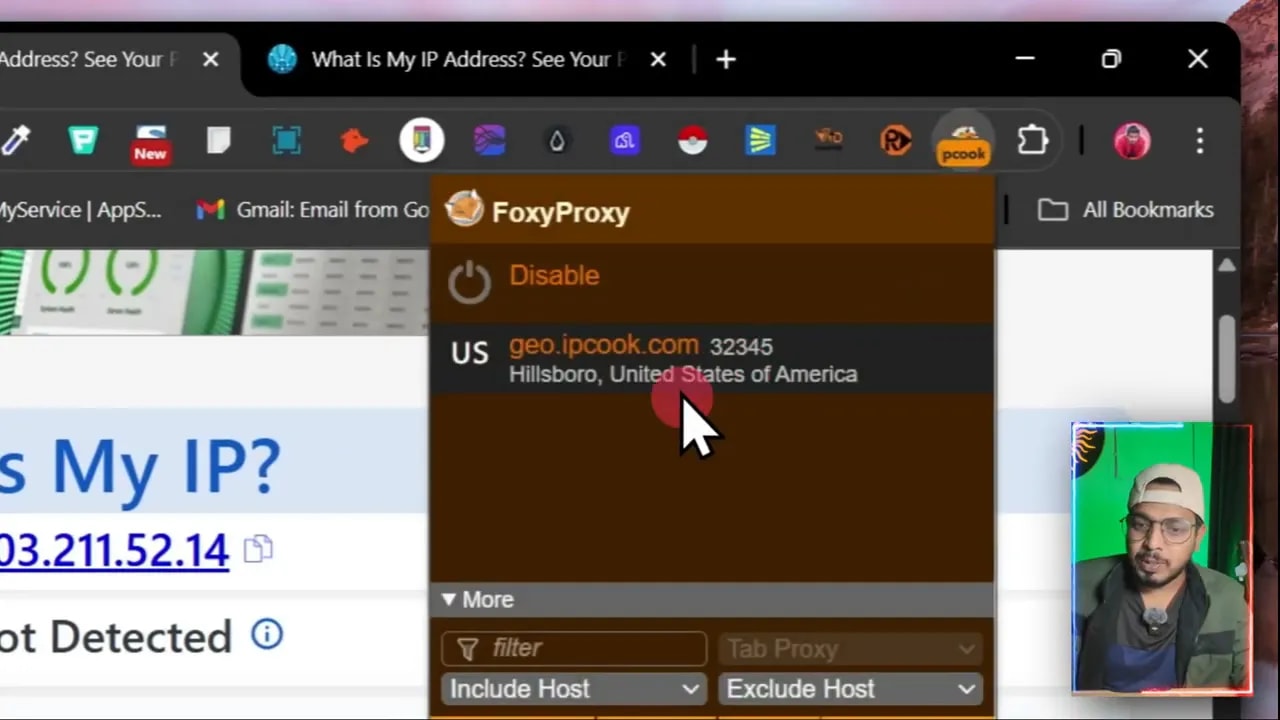
Here are two quick visual checks that show the difference between browsing without a proxy and after connecting through a US residential IP.
What Ipcook offers (quick summary)
This Ipcook review focuses on the practical features that matter:
- Large residential pool: millions of real-user IPs across many countries, which reduces bans.
- Geo-targeting: select country or region to get accurate localized results.
- Rotation options: static, randomized, or session-based rotations depending on your workflow.
- API and integrations: use generated endpoints in apps or automation scripts.
- Affordable entry: small top-ups get you started — useful for testing before committing.
Step-by-step setup (fastest way to get running)
These are the practical steps to create a residential proxy and use it in your browser. The sequence works for Chrome, Firefox, and Safari when combined with a simple extension.
- Create an account and top up — add a small amount (for testing, $5 is enough).
- Generate residential proxies — pick the country, set state to random if you want variety, choose protocol (HTTP is common), and set rotation to randomized if you need changing IPs.
- Create a sub-account — this keeps project credentials separate and manageable.
- Generate the IPs — choose how many proxies you need and copy the provided links or API endpoint for integration.
- Install a proxy manager extension — a tool like FoxyProxy makes switching between proxies simple. Add your proxy details into the extension and save.
- Test in-browser — search “what is my IP” to confirm the proxy location. Use incognito windows to test scraping behavior and verify localized search results.
Real examples and use cases
Want to research US pricing trends while sitting in India? Set the proxy to the United States, search “best laptops for students,” and the results, prices, and local products will reflect the US market instead of your local region. That makes competitive research and market validation much more accurate.
Other common uses:
- SEO audits: see SERP differences between regions without traveling.
- Lead scraping: collect business listings in targeted locations reliably.
- Account and automation work: reduce the chance of blocks when managing multiple social accounts or automation jobs.
Pros and things to watch for
- Pros: large IP pool, easy setup, API support, affordable test tiers.
- Watch for: choose the right rotation and protocol for your task; aggressive scraping still needs respectful throttling to avoid IP reputation issues.
Pricing and promo details
Entry-level top-ups let you test the service without a big commitment. For many projects, Ipcook review users find that a small initial spend reveals whether it meets speed and geo-targeting needs. Promo codes and trial data are often available to reduce risk — look for an extra discount code like IPRE10 when signing up.
Conclusion
This Ipcook review is focused on practical value: if you need reliable geo-targeted results, lower ban rates, and a straightforward setup, residential proxies from a large provider are worth testing. The combination of easy proxy generation, browser integration, and a sizable IP pool makes tasks like SEO research and lead scraping more predictable and private.
FAQ
How do I confirm the proxy is working?
Open an incognito window and search “what is my IP” or visit an IP lookup site. The displayed location should match the country or city you selected when creating the proxy.
Will using a proxy stop all tracking?
Proxies hide your IP but do not block cookies, browser fingerprinting, or login-based tracking. Combine proxies with privacy settings, cookie management, and, when necessary, browser isolation strategies.
Can I use Ipcook for scraping and automation?
Yes. With rotating residential IPs and API integrations, it is well suited for scraping and automation. Respect rate limits and target site terms to avoid reputation issues.
Is Ipcook suitable for SEO research across countries?
Yes. Geo-targeted proxies let you view search results and localized content from another country, providing accurate insights for keyword and competitor research.